
Elphapex – ASIC Miners & Management Software
Elphapex Tool is a Windows application designed for managing,
configuring, and monitoring Elphapex ASIC miners in local networks.
What is Elphapex?
Elphapex is a manufacturer of ASIC miners designed for cryptocurrency mining. Elphapex devices are widely used in both home and industrial mining environments due to their efficiency, stability, and optimized firmware.
Elphapex ASIC miners are commonly used in mining farms where stable operation, centralized management, and fast configuration are critical. To simplify daily maintenance and monitoring of Elphapex devices, specialized management software is required.
Key Features of Elphapex Tool
Elphapex Tool is a specialized management software developed specifically for Elphapex ASIC miners.
It is designed to simplify large-scale device management, reduce manual configuration time, and provide full control over Elphapex mining hardware within a local network.
By combining automatic device detection, real-time monitoring, and batch configuration tools, Elphapex Tool allows both home miners and industrial mining farms to efficiently manage multiple Elphapex ASIC miners from a single interface.
Core capabilities of Elphapex Tool include:
Bulk miner configuration — manage and configure multiple Elphapex ASIC miners simultaneously, applying settings to all devices or selected groups.
Quick pool switching — instantly update mining pool URLs, worker names, and passwords across multiple Elphapex devices with a single action.
Real-time device monitoring — track hashrate, average performance, temperatures, fan speeds, power status, and overall system health.
Automatic miner detection — scan the local network and automatically detect all connected Elphapex ASIC miners without manual IP input.
Firmware update support — perform batch firmware upgrades for supported Elphapex models directly through the tool.
Password & IP management — change device passwords in bulk and manage basic network configuration for Elphapex miners.
Elphapex Tool is optimized for Windows systems and operates entirely within the local network, providing a fast, stable, and secure environment for managing Elphapex ASIC mining devices.
Quick Install: Elphapex Tool
Elphapex Tool is the official Windows utility designed specifically
for managing and configuring Elphapex ASIC miners in local networks.
Download the latest version of Elphapex Tool for Windows.
You can download the latest version of Elphapex above on our website.Extract the downloaded archive to a convenient location on your computer.
No installation is required — the program runs as a standalone .exe file.Launch
ElphapexTool.exeby double-clicking it.
After launching, the tool will automatically scan your local network and display all detected ElphaPex miners.Enter your network IP range or use the automatic scan mode.
Elphapex Tool will detect available devices and show their status, hashrate, temperature, and fan speed.Configure your miners by selecting one or multiple devices and updating pool settings, worker names, and passwords with a single click.
 ElphaPexTool 1.0.1.1 (20250904)
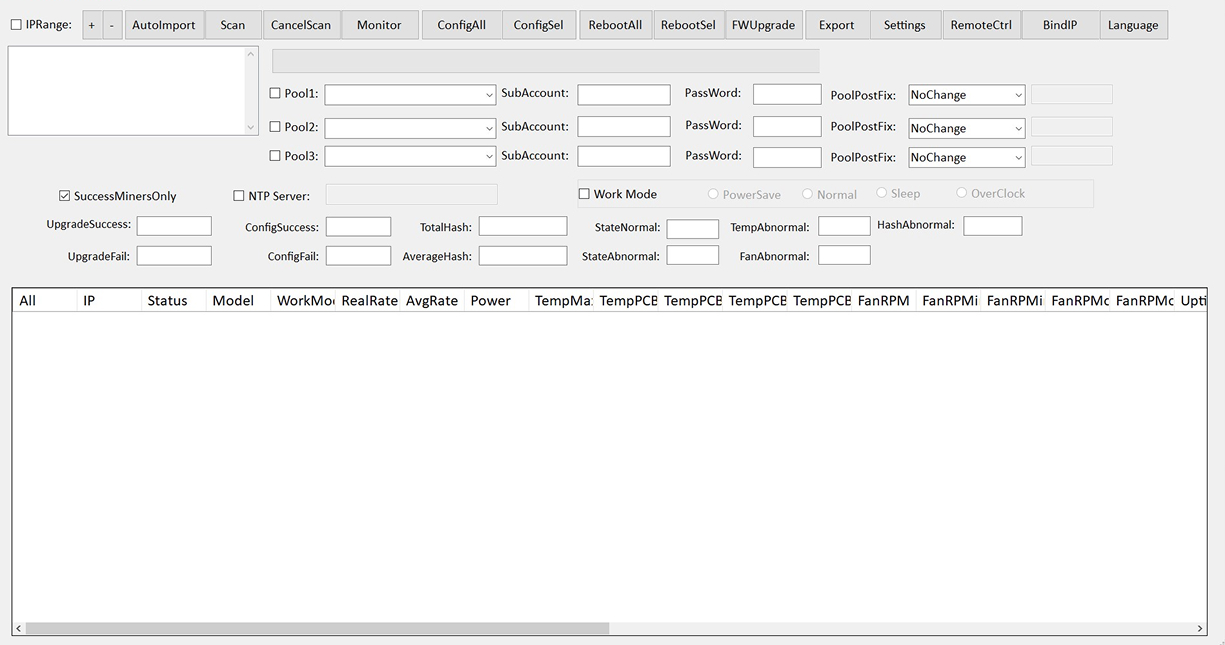
Elphapex Tool Configuration for Elphapex ASIC Miners
This section explains how to configure and manage Elphapex ASIC miners using Elphapex Tool. The configuration process covers network scanning, pool setup, firmware upgrades, monitoring, and device control.
Network Scan
After launching the program, the first task is to detect miners in your local network.
- Enable the IPRange option.
- Enter the IP range of your network, for example:
- 192.168.0.1 – 192.168.0.255
- Click Scan.
The program will automatically detect all ElphaPex devices and display them in the list.
Pool Configuration
To configure mining pools, use ConfigAll (apply to all miners) or ConfigSel (apply to selected miners).
Parameters to configure:
- Pool URL
- SubAccount / WorkerName
- Password (if required)
- Pool Postfix (if applicable)
After filling out the fields, click:
- ApplyConfigAll — apply settings to all detected miners
- ApplyConfigSel — apply settings to selected miners
Changes take effect automatically after being applied.
Device Reboot
Rebooting may be required after changing configurations or upgrading firmware.
- RebootSel — reboot selected devices
- RebootAll — reboot all detected devices
Firmware Upgrade
ElphaPex Tool supports bulk firmware upgrades.
- Open the FWUpgrade section.
- Specify the path to the firmware file (
.bin). - Select the devices you want to update.
- Click Start.
The program will display the progress and status for each device.
Miner Monitoring
The Monitor tab allows you to track key parameters:
- Current hashrate
- Average hashrate
- Chip temperatures
- Fan speeds
- Power consumption
- Pool connection status
- Device uptime
All values are updated in real time.
Additional Features
- Bulk editing of all configuration parameters
- Operating mode control (Normal, Sleep, PowerSave)
- Saving and loading configuration files
- Manual import and export of settings
- Remote device control
- Selective parameter updating
- Language selection
Conclusion
Elphapex Tool provides a complete configuration and management solution for Elphapex ASIC miners. By combining automated network detection, bulk configuration, firmware upgrades, and real-time monitoring, the software simplifies daily operations for both home users and large-scale mining farms.
Video Guid
Comparison Table
While Elphapex Tool is specifically designed for managing Elphapex ASIC miners, other mining management solutions focus on different hardware manufacturers or multi-brand environments. The table below compares Elphapex Tool with popular alternatives to highlight key differences.
| Feature | ElphaPex Tool | BTC Tools | Awesome Miner |
|---|---|---|---|
| Primary focus | ElphaPex ASIC miners | Antminer-based ASIC miners | Multi-brand ASIC & GPU management |
| Supported OS | Windows | Windows, Linux | Windows (desktop & server) |
| Bulk miner configuration | Yes | Yes | Yes |
| Automatic network scan | Yes | Yes | Yes |
| Firmware upgrade | Built-in for ElphaPex devices | Not supported | Yes |
Troubleshooting Elphapex ASIC Miners & Elphapex Tool
The program does not detect miners
Possible reasons & solutions:
- Make sure your PC and miners are on the same local network.
- Enable the IPRange option and enter the full IP range (e.g.,
192.168.0.1 – 192.168.0.255). - Disable VPN, proxy, or firewall rules that may block network scanning.
- Ensure miners respond to ping.
Connection Failed or timeouts
Try the following:
- Restart both the router and the miners.
- Make sure the miner’s web interface opens in a browser — if not, the miner may be unstable.
- Check that no other software is blocking ports (antivirus, monitoring apps, etc.).
Firmware upgrade does not start
Check this:
- Confirm that the firmware file is in .bin format.
- Only ElphaPex devices support bulk firmware upgrades.
- Ensure the miner has enough free memory to unpack firmware.
- Restart the device and try again.
Program freezes or closes unexpectedly
Possible fix:
- Run ElphaPex Tool as Administrator.
- Disable third-party antivirus temporarily.
- Download the latest version from the official website — older builds may contain bugs.
- Ensure your system has enough RAM.
FAQ - ElphaPex Tool
What is Elphapex?
Elphapex (ElphaPex) is a manufacturer of ASIC miners designed for cryptocurrency mining. Elphapex devices are used in home and industrial mining environments and are known for stable operation and optimized firmware.
What devices does ElphaPex Tool support?
ElphaPex Tool works exclusively with ElphaPex ASIC miners. It is optimized for Elphapex devices such as DG1+, DG1 Pro and future Elphapex firmware releases.
Does the tool work on Windows only?
Yes. ElphaPex Tool is designed for Windows-based systems.
Support for other operating systems is not available at the moment.
Why doesn’t the program detect my miners?
Most often the issue is caused by:
- different subnets,
- incorrect IPRange settings,
- firewall restrictions.
Make sure your PC and miners are on the same network and try scanning again.
Can I update firmware for multiple miners at once?
Yes. ElphaPex Tool supports bulk firmware upgrades for ElphaPex devices through the FWUpgrade feature.
Does the program require an internet connection?
No. All operations — scanning, configuring and monitoring — work entirely in your local network.
Is ElphaPex Tool free?
Yes, the program is free to use for all ElphaPex miners.